
EVO Router
One endpoint in front of the models you already call. EVO learns which requests need the model you are paying for and which do not, then moves only the ones it can prove are safe to move.
https://api.evo-hq.com/v1 and prefix your model with evo-auto/. The model you name stays the fallback, so the worst case is the behavior you have today.
- base_url="https://api.openai.com/v1"
- model="gpt-4.1"
+ base_url="https://api.evo-hq.com/v1"
+ model="evo-auto/gpt-4.1"
What the prefix means
The model string carries the routing decision, and the model you name inside it is always the fallback.
| Model string | Behavior |
|---|---|
evo-auto/gpt-4.1 | EVO routes. Cheaper candidates serve traffic where they qualify; gpt-4.1 serves the rest. |
gpt-4.1 | Sent straight to gpt-4.1. Your existing model strings keep working unchanged. |
Two things hold once the prefix is on:
- Nothing routes until it qualifies. A candidate has to clear your evaluation criteria on your own traffic before it is eligible for production, and you can require manual approval on top of that.
- The fallback is always yours. When nothing qualifies, or a candidate errors or rate-limits, the request runs on the model you named.
How a workload rolls out
Setting the prefix does not move traffic. It makes the workload eligible to move, and EVO works through three stages on its own.
| Stage | What serves your traffic |
|---|---|
| Observe | The model you named, on every request, while EVO builds a baseline from real traffic. |
| Qualify | Still the model you named. Candidates are tested against your evaluation criteria without serving anyone. |
| Route | Qualified candidates on the traffic they hold up on, your model on the rest. |
You do not drive these. There is no staging flag to set and no percentage to creep upward, because a fraction of traffic only buys a fraction of the evidence, and the requests a sample drops are disproportionately the ones worth learning from. Send EVO everything from day one and let the qualification gate, not the volume, be the thing holding traffic back.
If you want a hard stop before anything moves, turn on manual approval and the Route stage waits for you.
Naming the workload
The prefix says whether to route. A workload says what the request is for, and it is the unit EVO evaluates against, so it is worth naming explicitly.
x-evo-workload: support-copilotA workload is one job your product does: replying to a support ticket, reviewing a risk case, summarizing an account. Calls that share a prompt and a quality signal belong to the same one. Pick a stable, human-readable name. Without the header, EVO infers the workload from the shape of the call, which works but gives you less control over how calls are grouped.
evo-auto/gpt-4.1 as the model exactly as you would anywhere else. The gateway adds its own provider namespace in front, and the prefix reaches EVO intact. See Gateways.OpenAI-compatible, and native Anthropic
| Surface | Base URL |
|---|---|
OpenAI-compatible (/chat/completions, /responses) | https://api.evo-hq.com/v1 |
Anthropic native (/messages) | https://api.evo-hq.com/anthropic |
Anything built on the OpenAI schema (the OpenAI SDKs, the Vercel AI SDK, LangChain, LlamaIndex, Instructor, most agent frameworks) goes through the first one. If you call Anthropic directly, use the second.
Get an API key
EVO Router is in private beta. Request access, and you get back a key and a provisioned account.
export EVO_API_KEY="evo_..."Authenticate as you would with any OpenAI-compatible provider:
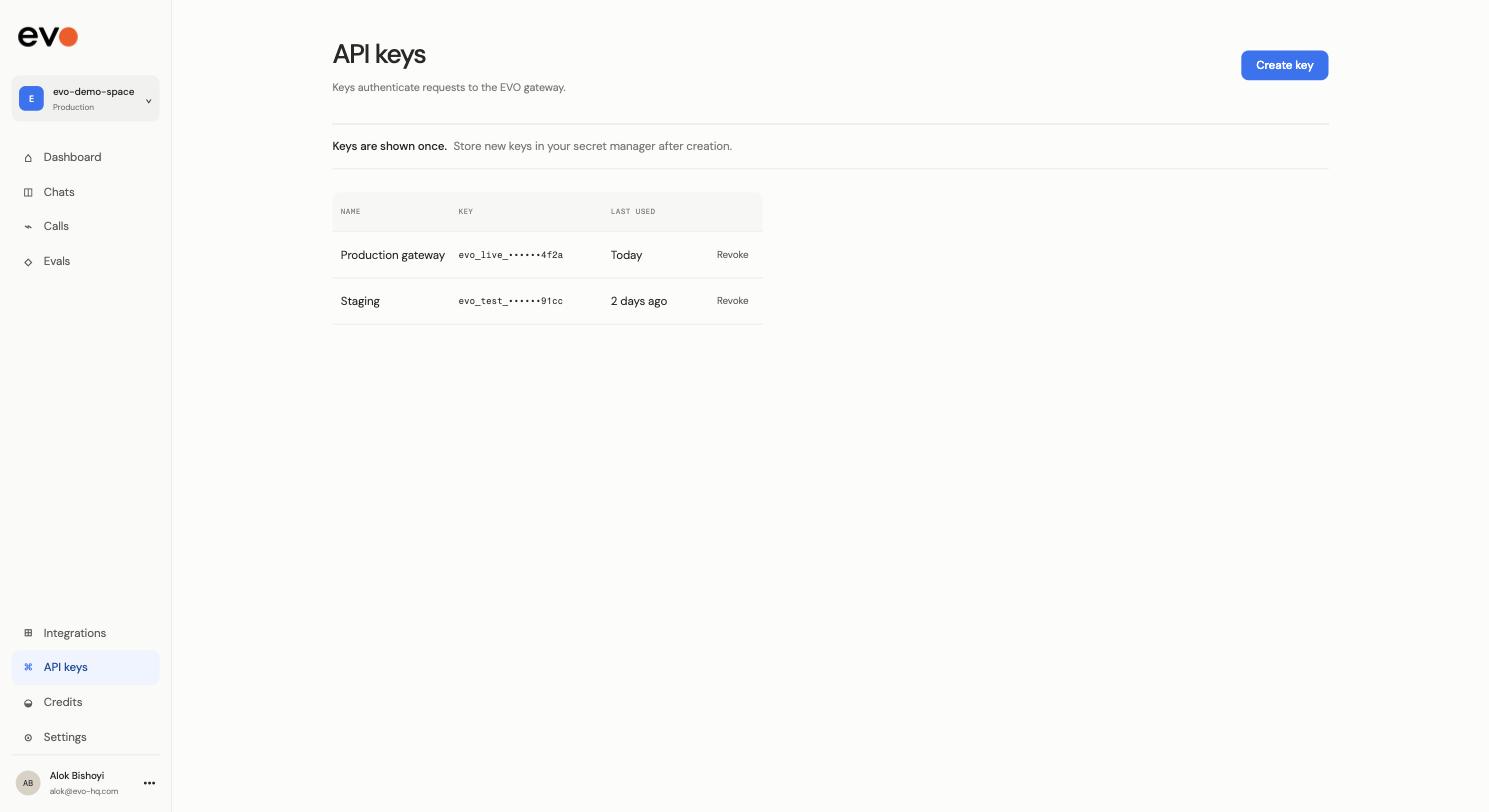
Authorization: Bearer $EVO_API_KEYKeys are shown once at creation and are not readable afterwards, so store the value in your secret manager as soon as you create it. Use a separate key per environment so you can revoke one without taking the others down, and revoke rather than rotate in place if one leaks.
Your provider keys
EVO can bill you for inference directly, or route through your own provider accounts so your existing rates, quotas, and commitments keep applying. If you want to bring your own keys, say so when you request access and they are attached to your account rather than sent on every request.
Authorization header. That slot holds your EVO key. Upstream credentials are resolved server-side.Connect your app
Three ways in, depending on where your model calls live.
1. Let the GitHub App open the PR
If your calls live in a repo, this is the shortest path. The app finds every model call site and opens one pull request that moves them to EVO. Merging it does not change what serves your traffic, because a workload has to qualify before anything moves. Setup, permissions, and what the scan covers are under GitHub.
It also flags the call sites it deliberately left alone. See what stays direct.
2. Switch the endpoint yourself
OpenAI, Python
from openai import OpenAI

client = OpenAI(
    api_key=os.environ["EVO_API_KEY"],
    base_url="https://api.evo-hq.com/v1",
    default_headers={"x-evo-workload": "support-copilot"},
)

resp = client.chat.completions.create(
    model="evo-auto/gpt-4.1",
    messages=[{"role": "user", "content": "..."}],
)
OpenAI, TypeScript
import OpenAI from "openai";

const client = new OpenAI({
  apiKey: process.env.EVO_API_KEY,
  baseURL: "https://api.evo-hq.com/v1",
  defaultHeaders: { "x-evo-workload": "support-copilot" },
});

const resp = await client.chat.completions.create({
  model: "evo-auto/gpt-4.1",
  messages: [{ role: "user", content: "..." }],
});
Anthropic, Python
from anthropic import Anthropic

client = Anthropic(
    api_key=os.environ["EVO_API_KEY"],
    base_url="https://api.evo-hq.com/anthropic",
    default_headers={"x-evo-workload": "risk-review"},
)

resp = client.messages.create(
    model="evo-auto/claude-sonnet-4.5",
    max_tokens=1024,
    messages=[{"role": "user", "content": "..."}],
)
Vercel AI SDK
import { createOpenAI } from "@ai-sdk/openai";

const evo = createOpenAI({
  apiKey: process.env.EVO_API_KEY,
  baseURL: "https://api.evo-hq.com/v1",
  headers: { "x-evo-workload": "support-copilot" },
});

const { text } = await generateText({ model: evo("evo-auto/gpt-4.1"), prompt: "..." });
curl
curl https://api.evo-hq.com/v1/chat/completions \
  -H "Authorization: Bearer $EVO_API_KEY" \
  -H "x-evo-workload: support-copilot" \
  -H "Content-Type: application/json" \
  -d '{
    "model": "evo-auto/gpt-4.1",
    "messages": [{"role": "user", "content": "..."}]
  }'
3. Add EVO to the gateway you already run
If traffic already goes through Bifrost, LiteLLM, or Portkey, do not put EVO in front of it. Register EVO inside it. See Gateways.
What stays direct
The router proxies chat and messages traffic. Leave these on their existing clients:
- Gemini and Vertex native calls. A different request schema, not an OpenAI-compatible one.
- Bedrock. Requests are SigV4-signed against an AWS host, so they cannot be re-pointed.
- Azure OpenAI deployment URLs. The model lives in the URL path, not the request body.
- Realtime and websocket sessions.
- Files, batch, and fine-tuning endpoints. Stateful, and tied to the account that created the object.
- Embeddings, image, and audio. No routing decision to make.
Frameworks
Every framework here builds on an OpenAI-compatible or Anthropic client underneath, so the change is the same one twice: give the client EVO's base URL, and prefix the model. Nothing about your chains, agents, tools, or state changes.
LangChain
from langchain_openai import ChatOpenAI

llm = ChatOpenAI(
    model="evo-auto/gpt-4.1",
    base_url="https://api.evo-hq.com/v1",
    api_key=os.environ["EVO_API_KEY"],
    default_headers={"x-evo-workload": "support-copilot"},
)
import { ChatOpenAI } from "@langchain/openai";
const llm = new ChatOpenAI({
model: "evo-auto/gpt-4.1",
apiKey: process.env.EVO_API_KEY,
configuration: {
baseURL: "https://api.evo-hq.com/v1",
defaultHeaders: { "x-evo-workload": "support-copilot" },
},
});LangGraph
LangGraph takes the model from LangChain, so configure the client as above and pass it to the node. Give each node its own workload if they do different jobs, since a planner and a summarizer should not be evaluated against the same bar.
planner = ChatOpenAI(
    model="evo-auto/gpt-4.1",
    base_url="https://api.evo-hq.com/v1",
    default_headers={"x-evo-workload": "agent-planner"},
)
summarizer = ChatOpenAI(
    model="evo-auto/gpt-4.1",
    base_url="https://api.evo-hq.com/v1",
    default_headers={"x-evo-workload": "agent-summarizer"},
)
LlamaIndex
from llama_index.llms.openai import OpenAI

Settings.llm = OpenAI(
    model="evo-auto/gpt-4.1",
    api_base="https://api.evo-hq.com/v1",
    api_key=os.environ["EVO_API_KEY"],
    default_headers={"x-evo-workload": "docs-qa"},
)
Leave the embedding model pointed at your provider. Embeddings are not routed.
OpenAI Agents SDK
from agents import Agent, OpenAIChatCompletionsModel
from openai import AsyncOpenAI

client = AsyncOpenAI(
    base_url="https://api.evo-hq.com/v1",
    api_key=os.environ["EVO_API_KEY"],
    default_headers={"x-evo-workload": "support-copilot"},
)

agent = Agent(
    name="Support",
    model=OpenAIChatCompletionsModel(model="evo-auto/gpt-4.1", openai_client=client),
)
Vercel AI SDK
import { createOpenAI } from "@ai-sdk/openai";

const evo = createOpenAI({
  apiKey: process.env.EVO_API_KEY,
  baseURL: "https://api.evo-hq.com/v1",
  headers: { "x-evo-workload": "support-copilot" },
});

const { text } = await generateText({
  model: evo("evo-auto/gpt-4.1"),
  prompt: "...",
});
Mastra
import { Agent } from "@mastra/core/agent";
import { createOpenAI } from "@ai-sdk/openai";

const evo = createOpenAI({
  apiKey: process.env.EVO_API_KEY,
  baseURL: "https://api.evo-hq.com/v1",
  headers: { "x-evo-workload": "support-copilot" },
});

export const support = new Agent({
  name: "support",
  model: evo("evo-auto/gpt-4.1"),
});
Pydantic AI
from pydantic_ai import Agent
from pydantic_ai.models.openai import OpenAIModel
from pydantic_ai.providers.openai import OpenAIProvider

model = OpenAIModel(
    "evo-auto/gpt-4.1",
    provider=OpenAIProvider(
        base_url="https://api.evo-hq.com/v1",
        api_key=os.environ["EVO_API_KEY"],
    ),
)
agent = Agent(model)
CrewAI
from crewai import LLM

llm = LLM(
    model="openai/evo-auto/gpt-4.1",     # CrewAI routes through LiteLLM
    base_url="https://api.evo-hq.com/v1",
    api_key=os.environ["EVO_API_KEY"],
)
Instructor
Instructor wraps a client you construct, so point that client at EVO and structured output behaves as before:
import instructor
from openai import OpenAI

client = instructor.from_openai(
    OpenAI(
        base_url="https://api.evo-hq.com/v1",
        api_key=os.environ["EVO_API_KEY"],
        default_headers={"x-evo-workload": "extraction"},
    )
)

user = client.chat.completions.create(
    model="evo-auto/gpt-4.1",
    response_model=User,
    messages=[{"role": "user", "content": "..."}],
)Spring AI
spring:
  ai:
    openai:
      base-url: https://api.evo-hq.com
      api-key: ${EVO_API_KEY}
      chat:
        options:
          model: evo-auto/gpt-4.1
Semantic Kernel
from semantic_kernel.connectors.ai.open_ai import OpenAIChatCompletion
from openai import AsyncOpenAI

kernel.add_service(
    OpenAIChatCompletion(
        ai_model_id="evo-auto/gpt-4.1",
        async_client=AsyncOpenAI(
            base_url="https://api.evo-hq.com/v1",
            api_key=os.environ["EVO_API_KEY"],
            default_headers={"x-evo-workload": "support-copilot"},
        ),
    )
)
One workload per job, not per app
Agent frameworks make it easy to point every call at one client and inherit one workload name. That works, but it groups a planner, a tool-selection step, and a final summary into a single unit, and EVO then has to hold the whole group to the hardest of their requirements.
Splitting them means each is evaluated against its own bar, which is usually where most of the savings are: the cheap classification step in a chain is often the one that did not need a frontier model, and the reasoning step is often the one that did.
Gateways
Your gateway already owns keys, retries, rate limits, and fallbacks. EVO goes inside it as one more provider, so it keeps owning traffic and you change one route.
Bifrost (Maxim)
Bifrost is Maxim's gateway. Register EVO in it, then send it everything:
- Register EVO as a provider. Type OpenAI-compatible, base URL
https://api.evo-hq.com/v1, credentialEVO_API_KEY. - Add the workload header to the virtual key that serves the workload, for example
x-evo-workload: risk-reviewonrisk-prod. - Give it full weight. EVO needs every request to build a baseline worth routing on, and until a candidate qualifies it forwards all of them to the model you named. Sending it a slice buys you nothing except a worse baseline.
providers:
  evo:
    type: openai
    base_url: https://api.evo-hq.com/v1
    keys:
      - value: env.EVO_API_KEY
        models: ["evo-auto/claude-sonnet-4.5"]
weight: 1.0LiteLLM
model_list:
  - model_name: support-copilot
    litellm_params:
      model: openai/evo-auto/gpt-4.1
      api_base: https://api.evo-hq.com/v1
      api_key: os.environ/EVO_API_KEY
      extra_headers: {"x-evo-workload": "support-copilot"}
Portkey
Portkey reaches a non-Portkey provider through custom_host. Set it in a config, or send it per-request as headers:
{
  "provider": "openai",
  "custom_host": "https://api.evo-hq.com/v1",
  "api_key": "$EVO_API_KEY",
  "forward_headers": ["x-evo-workload"],
  "override_params": { "model": "evo-auto/gpt-4.1" }
}
forward_headers is the part people miss. Without it Portkey strips x-evo-workload and EVO falls back to inferring the workload.
Helicone
Helicone proxies to an arbitrary upstream with Helicone-Target-Url, so it stays your logging layer and EVO sits behind it:
curl https://gateway.helicone.ai/v1/chat/completions \
  -H "Authorization: Bearer $EVO_API_KEY" \
  -H "Helicone-Auth: Bearer $HELICONE_API_KEY" \
  -H "Helicone-Target-Url: https://api.evo-hq.com" \
  -H "x-evo-workload: support-copilot" \
  -H "Content-Type: application/json" \
  -d '{"model": "evo-auto/gpt-4.1", "messages": [{"role": "user", "content": "..."}]}'
Cloudflare AI Gateway
Use the universal endpoint with compat, pointing the provider at EVO:
const client = new OpenAI({
  apiKey: process.env.EVO_API_KEY,
  baseURL: `https://gateway.ai.cloudflare.com/v1/${ACCOUNT_ID}/${GATEWAY}/compat`,
  defaultHeaders: {
    "cf-aig-authorization": `Bearer ${process.env.CF_AIG_TOKEN}`,
    "x-evo-workload": "support-copilot",
  },
});
Cloudflare keeps caching and rate limiting. Turn its cache off for workloads you want EVO to learn from, or EVO only sees the misses.
Vercel AI Gateway
import { createOpenAI } from "@ai-sdk/openai";

const evo = createOpenAI({
  apiKey: process.env.EVO_API_KEY,
  baseURL: "https://api.evo-hq.com/v1",
  headers: { "x-evo-workload": "support-copilot" },
});

const { text } = await generateText({
  model: evo("evo-auto/gpt-4.1"),
  prompt: "...",
});
Kong AI Gateway
An ai-proxy route with EVO as the upstream:
plugins:
  - name: ai-proxy
    config:
      route_type: llm/v1/chat
      auth:
        header_name: Authorization
        header_value: Bearer $EVO_API_KEY
      model:
        provider: openai
        name: evo-auto/gpt-4.1
        options:
upstream_url: https://api.evo-hq.com/v1/chat/completionsGitHub
The GitHub App is the fastest way to get integrated, and the only path that changes your code for you.
What it does
Point it at a repository and it reads the source for two things: every place you call a model, and every evaluation asset you already have. On a typical service that looks like scanning a few hundred files and finding a handful of call sites and one or two test suites worth reusing.
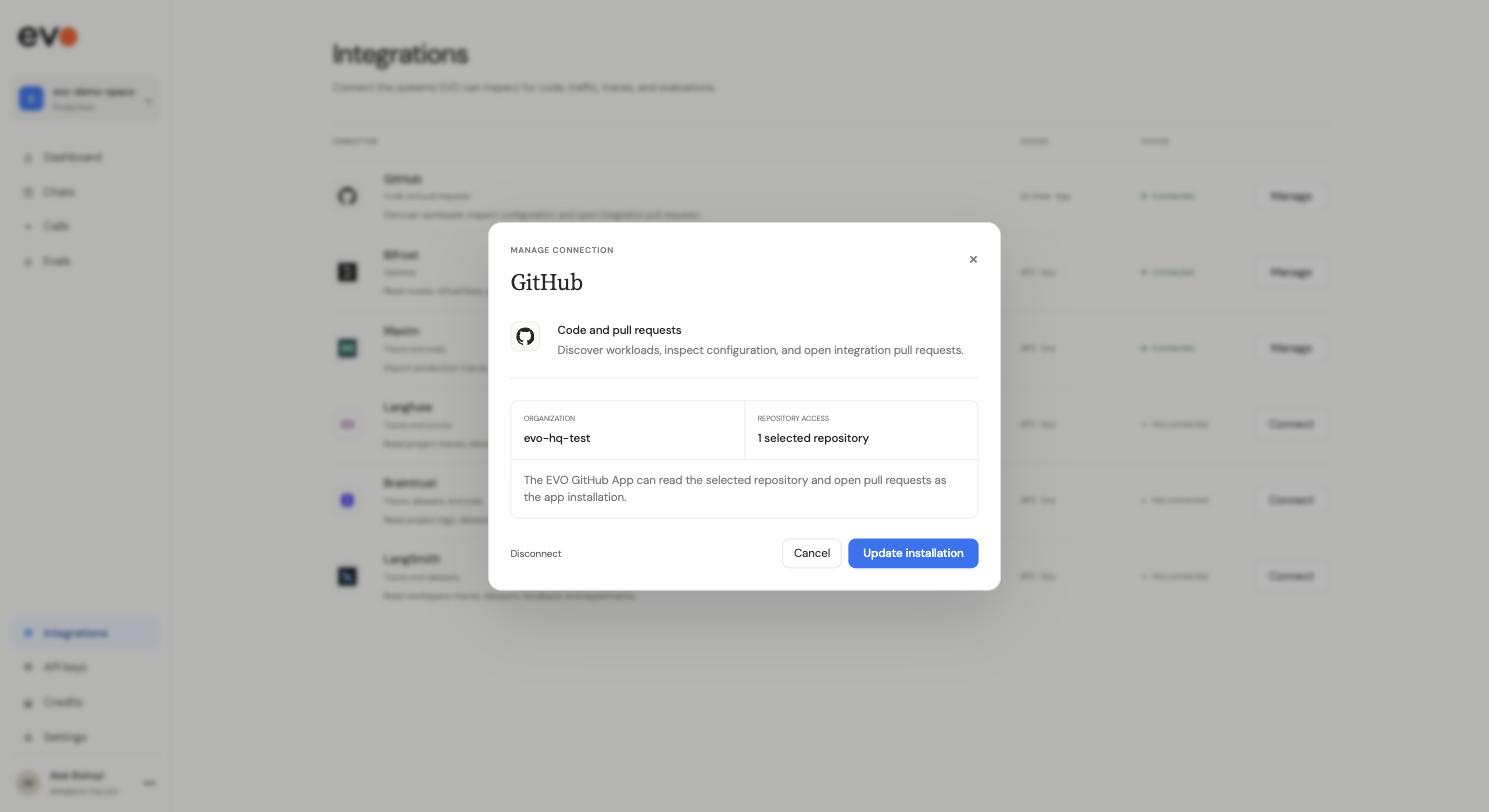
It then opens a single pull request that adds the EVO base URL, the evo-auto/ prefix, the workload header, and session metadata at each call site it found. Merging it is safe on its own: the prefix makes a workload eligible to move, and nothing moves until it clears your evaluation criteria.
Install
- Install the app on the organization or repositories you want EVO to see.
- Review the PR. It is a normal pull request. Edit it, comment on it, or close it.
- Add
EVO_API_KEYto the environment your service deploys from, as an environment secret rather than a plain repository secret if the repo deploys to more than one environment.
Permissions
| Scope | Access | Why |
|---|---|---|
| Contents | Read and write | Read source to find call sites; write the branch the PR is opened from. |
| Pull requests | Write | Open the integration PR and update it if you ask for changes. |
| Metadata | Read | Mandatory for every GitHub App. |
It does not request access to Actions secrets, deployments, or organization administration. It cannot read a secret you add, which is why EVO_API_KEY is a step you do yourself.
Integrations
Connect the systems EVO can inspect for code, traffic, traces, and evaluations. Everything here is read-only, and credentials are encrypted and write-only: EVO can use a connection but cannot retrieve the secret back.
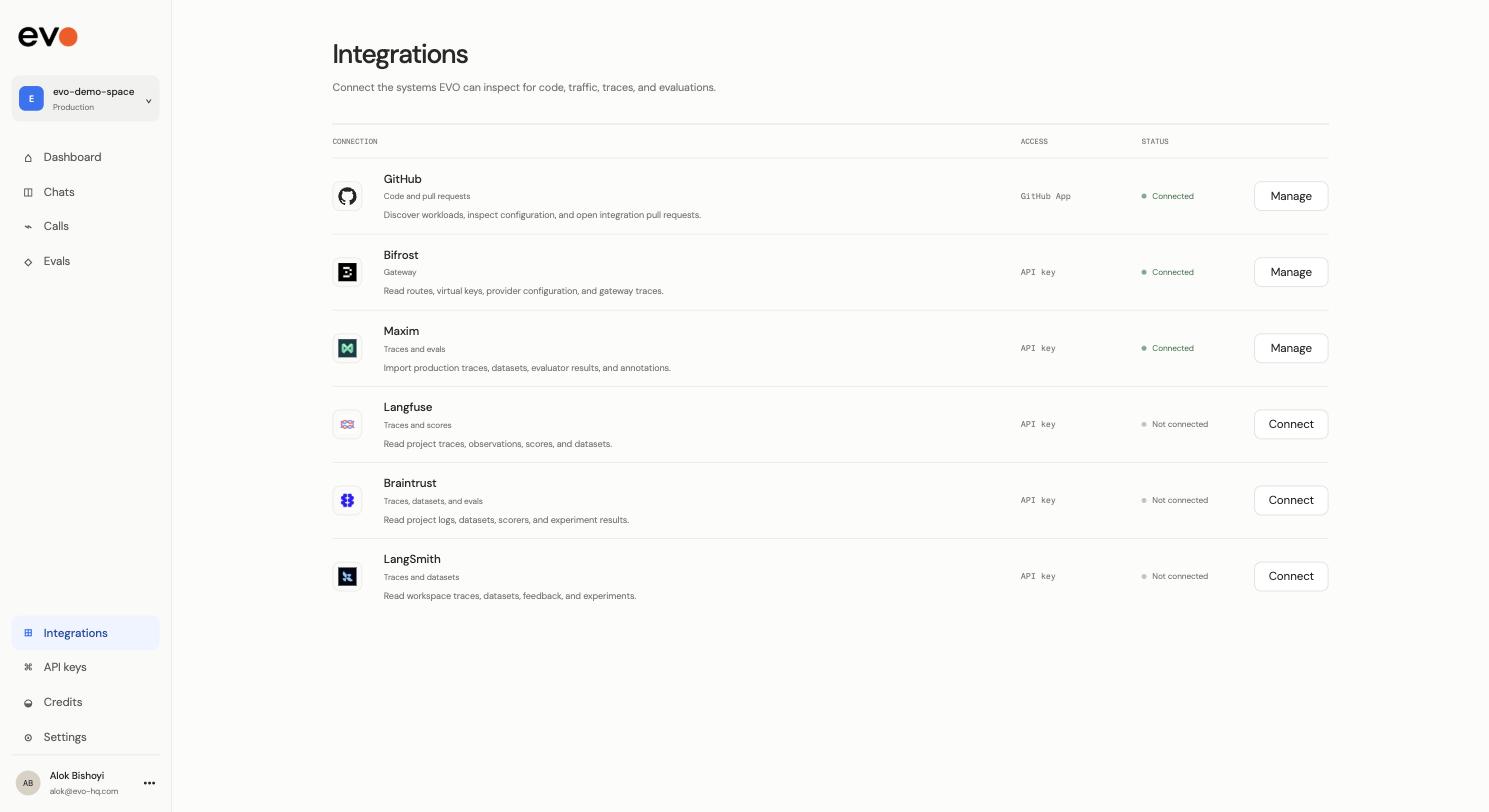
| Connection | What EVO reads | Access |
|---|---|---|
| GitHub | Code and pull requests. Discovers workloads, inspects configuration, opens integration pull requests. | GitHub App |
| Bifrost | Routes, virtual keys, provider configuration, and gateway traces. | API key |
| Maxim | Production traces, datasets, evaluator results, and annotations. | API key |
| Langfuse | Project traces, observations, scores, and datasets. | API key |
| Braintrust | Project logs, datasets, scorers, and experiment results. | API key |
| LangSmith | Workspace traces, datasets, feedback, and experiments. | API key |
None of these are required to start. With only the endpoint connected, EVO builds a baseline from your own traffic. Connecting a trace source means it starts from history you already have rather than waiting to accumulate it.
Connecting a source
Open Integrations, pick a connection, and fill in its fields. The dialog names exactly what it needs.
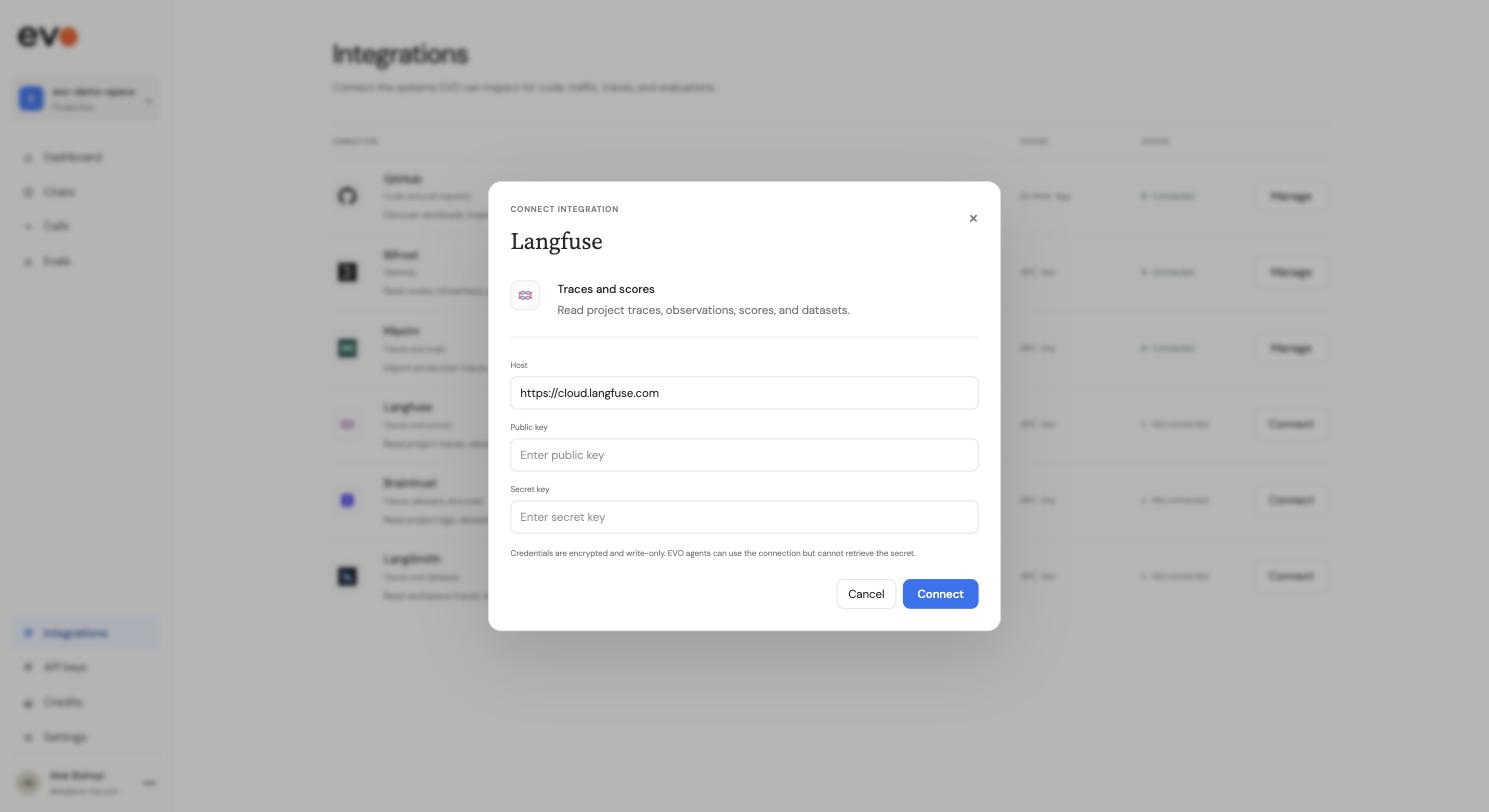
| Connection | Fields | Default endpoint |
|---|---|---|
| Bifrost | Bifrost URL, Authentication token | your gateway host |
| Maxim | API key | https://app.getmaxim.ai |
| Langfuse | Host, Public key, Secret key | https://cloud.langfuse.com |
| Braintrust | API URL, API key | https://api.braintrust.dev |
| LangSmith | API endpoint, Service key, Workspace ID | https://api.smith.langchain.com |
Each of Langfuse, Braintrust, and LangSmith can be pointed at a self-hosted deployment by changing the host or endpoint field. Reconnecting with a new value replaces the stored credential; the old one is not recoverable.
What each one is for
Bifrost is the traffic path. Connecting it lets EVO read your routes, virtual keys, and provider configuration, so it can see how a workload is currently served rather than inferring it. Setting it up as a provider is under Gateways.
Maxim, Langfuse, Braintrust, and LangSmith are history. They carry the two things EVO needs before it can move traffic: what your workloads actually receive, and how you already score them. Braintrust and Maxim carry both logs and evaluation results, so one connection covers the baseline and the bar. Langfuse carries scores alongside traces. LangSmith carries datasets and feedback.
If your scorers already run in one of these, EVO gates on them directly rather than asking you to define new ones. That matters more than it sounds: the bar a route has to clear should be the one your team already uses to decide whether a change is shippable.
API reference
Base URLs
| Path | Use |
|---|---|
https://api.evo-hq.com/v1/chat/completions | OpenAI Chat Completions |
https://api.evo-hq.com/v1/responses | OpenAI Responses |
https://api.evo-hq.com/anthropic/v1/messages | Anthropic Messages |
Request and response bodies are the provider's own. EVO does not add fields, rename them, or reshape streaming chunks, so an SDK cannot tell the difference. That is what makes the endpoint swap a two-line change.
Request headers
| Header | Required | Meaning |
|---|---|---|
Authorization: Bearer <EVO_API_KEY> | Yes | Your EVO key. |
x-evo-workload | No | The workload this call belongs to. Without it, EVO infers the workload from the shape of the call. |
Response headers
Every response carries the decision that produced it, so you can log it next to your own trace ID:
| Header | Meaning |
|---|---|
X-Evo-Workload-Id | The workload this request was attributed to. |
X-Evo-Policy-Id | The routing policy in force. |
X-Evo-Recipe-Id | The configuration that actually served the request. |
Model strings
| Model string | Behavior |
|---|---|
evo-auto/gpt-4.1 | Eligible for routing, with gpt-4.1 as the fallback. |
gpt-4.1 | Sent straight to gpt-4.1. The default, and what your code already sends. |
Naming the workload in the path
Some callers cannot set custom headers. The path form is equivalent to x-evo-workload and survives any client:
https://api.evo-hq.com/workloads/<workload>/v1/chat/completions
https://api.evo-hq.com/workloads/<workload>/anthropic/v1/messages
Checking a workload
Ask what a workload is configured to do without sending inference traffic:
curl https://api.evo-hq.com/workloads/<workload>/probe \
  -H "Authorization: Bearer $EVO_API_KEY"
It returns the incumbent, the active policy and its stage, and the exact model strings that workload accepts:
{
  "ok": true,
  "workload_id": "wl_...",
  "incumbent": { "provider": "openai", "model": "gpt-4.1" },
  "policy": { "policy_id": "pol_...", "stage": "shadow" },
  "supported_models": {
    "plain": "gpt-4.1",
    "auto": "evo-auto/gpt-4.1"
  }
}
Errors
Upstream provider errors are returned as the provider sent them, with the original status code. If a candidate route errors or rate-limits, the request is retried on the incumbent rather than failing.
Start here
Autoresearch-style optimization for any codebase, from two commands in your coding agent.
Give evo a repo and a goal. It can discover what to measure, set up the evaluation, and run experiments in a loop: trying changes, keeping what improves the score, and throwing away what does not.
It is inspired by Karpathy's autoresearch, then structured for codebases: tree search, parallel subagents, shared state, gates, and an inspectable dashboard.
When to use it
evo fits when you have a codebase it can run and a rough direction for "better" — speed, accuracy, cost, eval quality, or another measurable outcome. A metric can already exist, or discover can help turn the goal into a benchmark. Good first problems:
- Make a parser or hot path faster without breaking correctness.
- Raise an eval score for an agent skill or a prompt.
- Cut LLM token cost while keeping answer quality above a floor.
- Improve retrieval accuracy on a fixed question set.
It is a poor fit for open-ended work with nothing evo can score or run — redesigning an app, fixing a vague bug with no reproducible test, or code that cannot run in a clean checkout or configured backend.
What stays safe
- Your main branch is left untouched. Setup and every experiment happen in isolated copies of the repo.
- Each attempt runs in its own worktree or sandbox, so attempts never collide.
- A change that fails your checks is discarded — even if its score improved.
- Winning changes are kept as diffs you review. You decide what to merge.
What a run looks like
An illustrative run:
- benchmark
- pytest tests/bench_parser.py
- metric
- latency, lower is better
- gate
- tests/parser_correctness.py must pass
- baseline
- 41.2 ms
- experiments
- 15 run · 4 kept · 6 regressed · 5 gate rejected
- best passing
- 29.7 ms · 28% faster
- winning diff
- exp_028, left for you to review — main untouched
How you use it
Your main surface is small: invoke two skills through your coding agent and use the dashboard for evidence while the loop runs.
- discover — the agent inspects your project, chooses or creates the evaluation, and records the baseline.
- optimize — the agent launches measured attempts in isolated workspaces, keeps what improves, and rejects what breaks your checks.
The terms you'll see most often: a benchmark is the command that scores your code, a gate is a safety check that rejects a change if it breaks something even when the score improves, and an experiment is one attempted change running in its own workspace.
Install
Setup is one-time: install the evo CLI, make sure your coding host is installed, then add the evo plugin and hooks for that host. After that, your normal flow starts with /evo:discover and /evo:optimize.
uv tool install evo-hq-cli
evo install claude-code
evo doctor claude-code/evo:discover. Other hosts and remote backends are below.1. Install the evo CLI
uv tool install evo-hq-cliThis puts the evo binary on your PATH. The agent calls it; you keep it installed and current.
Remote backend extras
The default backend runs each experiment in a local git worktree and needs no extra packages. To let experiments run on a remote sandbox provider, install the CLI with the matching extra:
uv tool install 'evo-hq-cli[modal]'     # or [e2b], [daytona], [aws], [azure]
uv tool install 'evo-hq-cli[all]' # every provider| Extra | Backend |
|---|---|
[modal] | Modal serverless cloud |
[e2b] | E2B cloud sandboxes |
[daytona] | Daytona cloud workspaces |
[aws] | AWS EC2 sandboxes |
[azure] | Azure VMs |
[all] | all of the above |
The local worktree, pool, and ssh backends are included with the base install. You pick and configure the backend in the dashboard under Settings → Backend.
2. Install the host CLI
evo runs on top of an agentic coding host. Install the one you'll use if you don't already have it:
npm install -g @anthropic-ai/claude-code # or @openai/codex, openclaw, @earendil-works/pi-coding-agentFor Cursor, install the IDE from cursor.com, or install the cursor-agent CLI:
curl https://cursor.com/install -fsS | bash3. Install the plugin and host hooks
evo install <host> # claude-code | codex | cursor | hermes | opencode | openclaw | pievo install <host> installs the evo plugin into the host's marketplace and stages the hooks evo needs to deliver your mid-run directives and coordinate the agents it runs in parallel. Verify the install:
evo doctor <host>evo telemetry off, or use EVO_TELEMETRY=0 evo ... for one command/session or from the start after install.Supported hosts
| Host | evo install name | Agent invocation syntax |
|---|---|---|
| Claude Code | claude-code | /evo:discover, /evo:optimize |
| Codex | codex | $evo discover, $evo optimize |
| Cursor | cursor | / skill menu |
| Hermes | hermes | natural language |
| Opencode | opencode | natural language |
| OpenClaw | openclaw | natural language |
| Pi | pi | natural language |
Codex hook trust
Codex requires manual approval for plugin hooks. After installing, run /hooks inside codex to trust evo's hooks — or pass --trust-hooks at install time to skip the prompt:
evo install codex --trust-hooksOnce all three steps are done and evo doctor <host> reports clean, you're set up. Your ongoing surface is: invoke discover and optimize, watch the dashboard, and steer the run in plain language. See Quickstart for the first run, Using Evo for reports, shipping, and best practices, and Upgrading for keeping the CLI and plugin in lockstep.
Quickstart
The core flow is two commands you drive — the agent runs the evo CLI from there:
- Discover (one-time) — the agent explores the repo, figures out what to measure and which behaviors to gate, instruments the benchmark, and runs the first experiment to establish a baseline.
- Optimize — the agent runs the loop, trying changes in parallel each round. Tell it to run unattended for autonomous continuation, or tell it to check in after one round for manual pacing.
/evo:discover, /evo:optimize). Each host invokes the core skills differently — see the host invocation table further down. Whatever the host, you issue the invocation and the agent does the rest.What helps before the first run
You do not need to prepare the whole harness yourself. discover inspects the repo, helps identify the metric, finds or creates the benchmark, asks before wiring anything substantial, and adds gates when it builds an evaluation from scratch.
- Bring a rough direction: a file, behavior, bottleneck, cost problem, or eval goal is enough. evo can help turn that into a metric.
- Start from code the agent can run in a clean checkout or configured backend. If setup is missing, discover will surface it.
- If local edits matter, discover will ask you to commit or stash before it branches experiments.
Your first run
The fastest path is Claude Code with local worktrees. Install evo once in your shell, then open Claude Code inside the repo and invoke the skills there.
discover helps choose the metric, sets up the benchmark, records the baseline, and prints the dashboard URL.
optimize runs the loop. Keep the dashboard open while experiments land.
On another host, swap the invocation syntax (see Install); everything else is the same.
After a run, ask the agent for /evo:report when you want a read-only summary, or /evo:ship when you are ready to turn a result into a clean change. You do not need those for the first loop.
Host-specific invocation syntax
The core skills are the same on every host; only the way you invoke them differs. You issue the invocation; the agent runs the evo CLI from there.
| Host | How you invoke | Example |
|---|---|---|
| Claude Code | /evo: slash command | /evo:discover, /evo:optimize subagents=3 |
| Codex | $evo mention — plugin namespace then skill name | $evo discover, $evo optimize subagents=3 |
| Cursor | / skill menu | select discover / optimize from the menu |
| Hermes | natural language | "run evo discover", "start the evo optimize loop with 3 subagents" |
| Opencode | natural language | "run evo discover", "start the evo optimize loop with 3 subagents" |
| OpenClaw | natural language | "run evo discover", "start the evo optimize loop with 3 subagents" |
| Pi | natural language | "run evo discover", "start the evo optimize loop with 3 subagents" |
key=value form. On natural-language hosts, state the values in your request and the agent maps them to subagents, budget, and stall.During the default optimize loop, you can send plain-language directions such as "focus on retrieval first" or "use at most two GPUs" without restarting the run. See Steering a run with directives for details.
Using Evo
This is the practical path after install. Start with a rough improvement goal, let discover turn it into a measured setup, run optimize, watch the dashboard, then report or ship the result.
1. Discover a target
Invoke discover with either a broad request or a specific target:
/evo:discover make src/parser.py faster
$evo discover improve retrieval quality
The agent inspects the repo, helps choose the metric, finds or creates the benchmark, adds gates when it builds an evaluation from scratch, records the baseline, and starts the dashboard. You do not need to prepare the whole harness yourself.
Bring a direction, not a full spec: a file, behavior, bottleneck, cost problem, or eval goal is enough. If local edits would be missed by experiment branches, discover asks you to commit or stash before it proceeds.
2. Run optimize
After discover commits a baseline, invoke optimize to start the loop:
/evo:optimize
/evo:optimize subagents=3 budget=5 stall=3
Each round, the agent creates focused briefs, dispatches subagents in isolated workspaces, runs benchmarks and gates, keeps passing improvements, and discards the rest. Your wording still matters: "run unattended" means keep driving rounds; "run one round and check in" means stop after the batch.
| Parameter | What it controls |
|---|---|
subagents | Maximum live parallel experiment workers per round. |
budget | Maximum serial attempts each subagent can make on its branch. |
stall | How many no-improvement rounds to tolerate before stopping. |
3. Watch and configure
Open the dashboard URL that discover prints. Use it to watch experiments land, compare scores, inspect gates, see the tree, and tune runtime settings without editing files under .evo/.
- Backend chooses where experiments run: local worktrees, fixed pools, SSH, or cloud sandboxes.
- Environment stores setup commands, command prefixes, and env vars that experiments inherit.
- Frontier controls which branches the optimizer extends next.
See Dashboard for the screenshots and Where experiments run for backend details.
4. Steer a run
In the default optimize loop, you can send a plain-language directive while work is running:
- "Focus on retrieval first."
- "Use at most two GPUs."
- "Stop exploring caching; try batching instead."
Use the dashboard node + action when you want to branch from a specific parent. If you opt into Claude Code's workflow driver, use Workflow controls to monitor or message that run; evo direct is for the default prose loop and subagent sessions.
5. Report results
When you only want to inspect what happened, ask for /evo:report or the host equivalent. Reporting is read-only: the agent may call commands such as evo status, evo report, evo tree, evo frontier, evo show, and evo diff, but it should not run benchmarks, gates, Slurm jobs, ad-hoc scripts, or file edits.
A useful report includes the best score and delta from baseline, strongest frontier branches, top valid candidates even if they are not on the frontier, gate failures worth knowing about, and caveats such as held-out failures, ties, or noisy results.
6. Ship a result
Use /evo:ship when you are ready to turn a finished result into a maintainer-reviewable change:
/evo:ship
/evo:ship exp_0042
By default, ship selects the highest-scoring valid result in graph history, not merely the current frontier. Before touching your working branch, pushing, or opening a pull request, the agent shows the selected experiment, score delta, hypothesis, and diffstat and asks for confirmation.
Only valid candidates are shippable: committed results and exhausted-pruned results with passing gates. Invalid-pruned nodes, discarded nodes, failed nodes, active nodes, evaluated-but-not-kept nodes, gate-failed nodes, and descendants of invalid nodes are excluded.
7. Handle noisy evaluations
When scores are noisy, make the benchmark return the aggregate you actually trust. If you care about an n=3 median, have one evo run perform three repeats and print the median score. If a candidate passes the first screen and needs n=10, make that broader evaluation explicit before promoting it.
Avoid judging a candidate by the best replicate across many individual jobs. That rewards lucky initialization instead of generalizable improvement. Use gates, held-out slices, improvement thresholds, or cross-dataset checks when a score can improve by overfitting one dataset.
8. Use constrained resources
If resources are scarce, say the live limit directly: "use at most 2 GPUs", "subagents=2", or "only keep two jobs in flight." evo treats the subagent count as live concurrency, not total ideas.
For fixed local GPUs, the pool backend is often clearest: create one prepared workspace per slot, then let evo run experiments against those slots. For Slurm or another cluster scheduler, put scheduler submission inside the benchmark command and cap concurrency to the number of jobs you want in flight. evo drives measured experiments through your benchmark interface; it does not replace the scheduler.
Dashboard
The dashboard is your primary observability surface: watch experiments run, see scores land, navigate the experiment tree, and tune the search while it is in progress. Since the agent drives the CLI, the dashboard is how you stay in the loop without touching the command line.
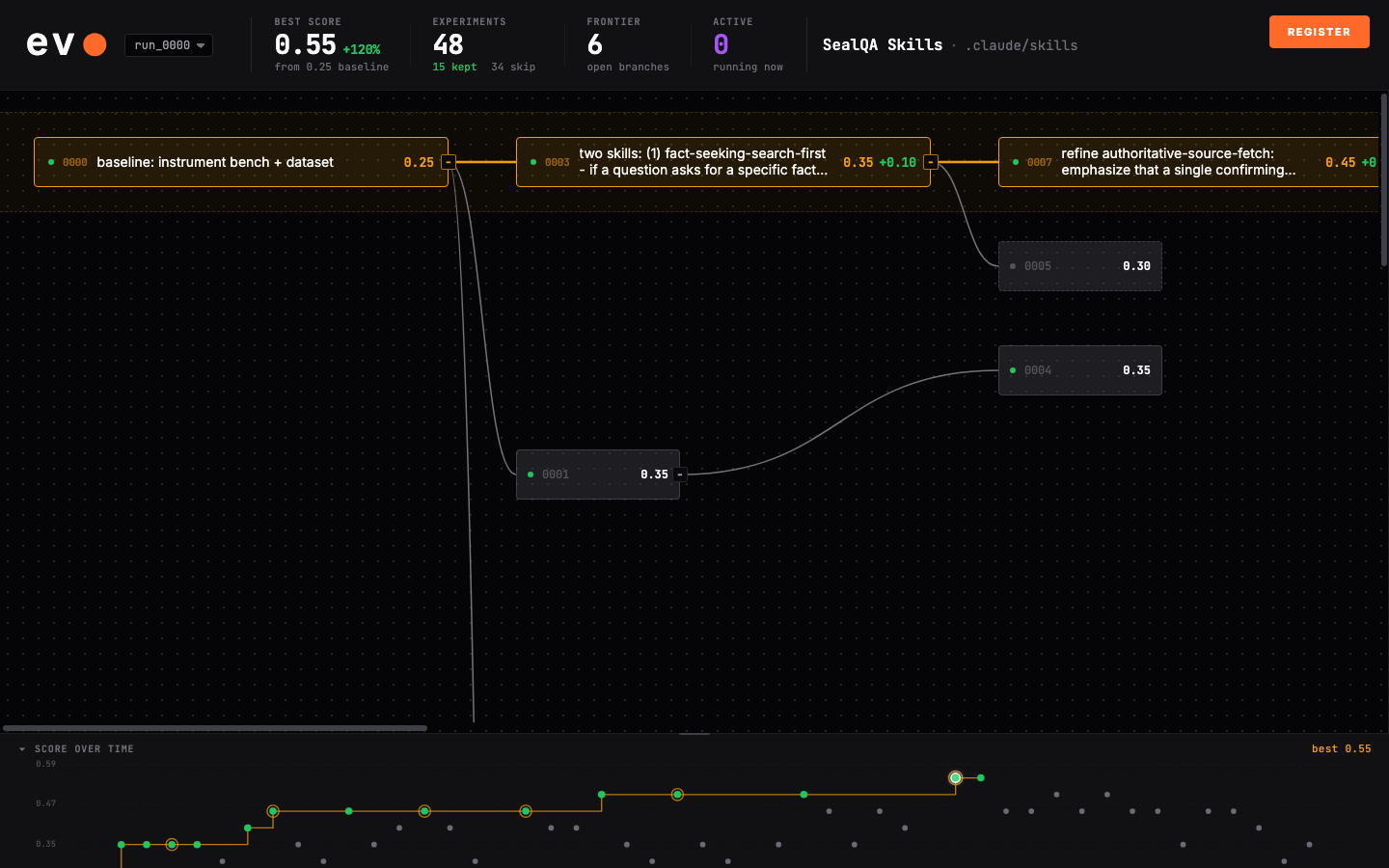
Starting the dashboard
The dashboard starts automatically when you invoke /evo:discover. It prints its URL in chat:
Dashboard live: http://127.0.0.1:8080 (pid 12345)Open that URL in a browser. If port 8080 is already in use, evo increments to the next free port (8081, 8082, and so on) and prints whichever it bound. Later runs reuse the chosen port, so the URL stays stable across sessions on the same project.
If you ever need to bring it up by hand — for example, after closing the tab — start it manually:
uv run --project /path/to/evo/plugins/evo evo dashboard --port 8080What you watch
At a glance, the dashboard tells you where the run stands:
- Best score — the current best passing result and its score history.
- Experiment count — how many attempts are active, kept, rejected, failed, or pruned.
- Experiment tree — which branches descended from which parent.
- Frontier — which nodes evo may branch from next.
- Gate status — whether safety checks are passing or blocking otherwise-good scores.
Each experiment the agent dispatches appears as it runs, scores as it completes, and slots into the experiment tree. The tree shows how branches descend from one another — each node is one experiment, extending a parent. The frontier strategy decides which branch the orchestrator extends next after every round, so the tree is also a live picture of where the search is spending its attention.
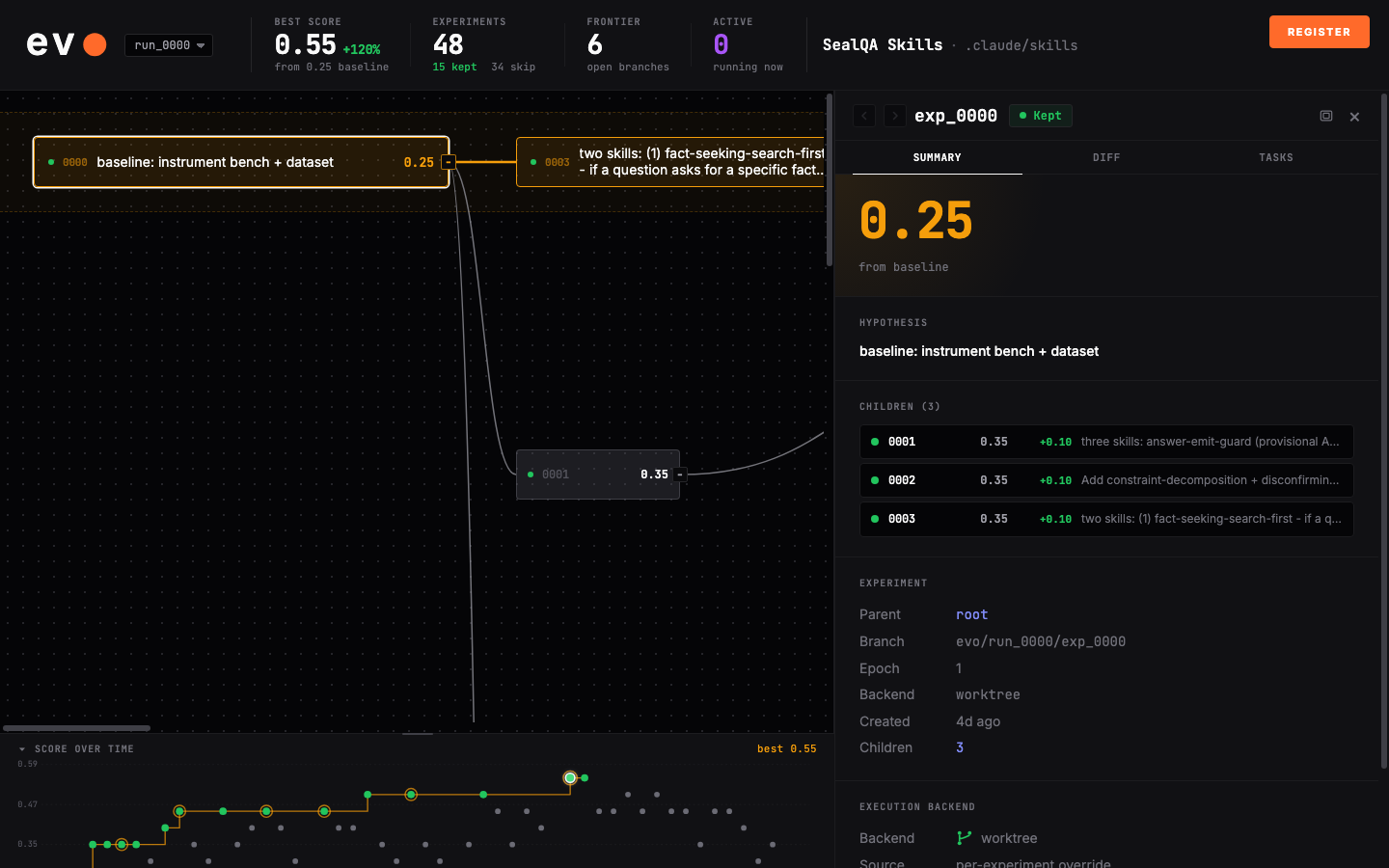
Configuring a run
Open Settings from the dashboard header to change run configuration without editing files under .evo/. The settings modal has three sections: Backend, Environment, and Frontier. These write through the same validated config layer the agent uses from the CLI.
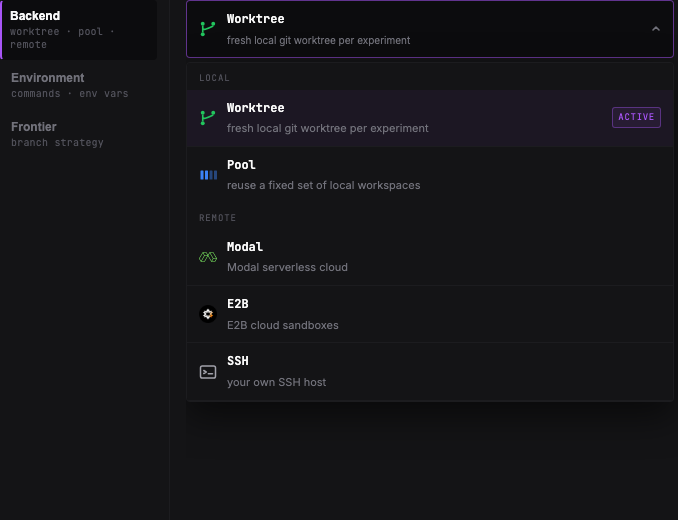
Backend
Choose where new experiments run. worktree creates a fresh local git worktree per experiment. pool reuses fixed local workspaces, useful when setup is expensive or resources such as GPUs are pre-assigned. Remote providers send experiments to SSH or cloud sandboxes.
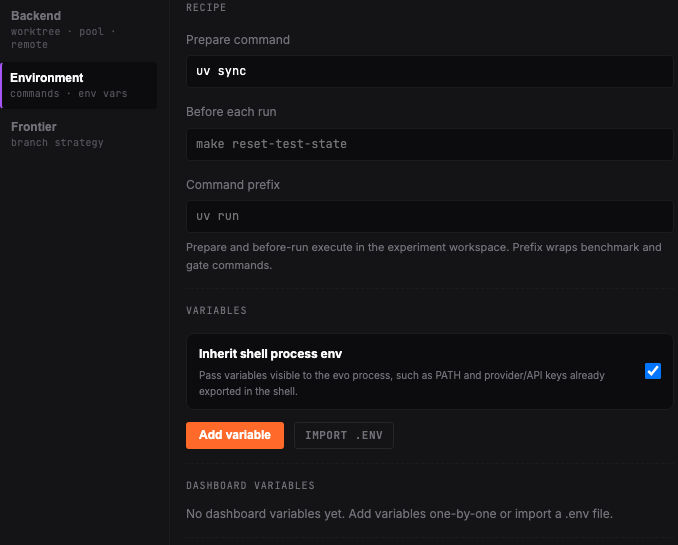
Environment
Set the runtime recipe and environment variables that every experiment inherits. Runtime commands and environment variables belong in evo configuration so experiments can run the same way in local worktrees, pools, SSH hosts, or remote sandboxes.
Frontier
Select and tune the frontier strategy — how the orchestrator picks which committed branch to extend next. The section lists each strategy's parameters:
| Strategy | Behavior |
|---|---|
argmax | Extend the highest-scoring branch. |
top_k | Round-robin among the K best. |
epsilon_greedy | Best most of the time, random sometimes. |
softmax | Sample weighted by score. |
pareto_per_task | Keep specialists the aggregate score hides. |
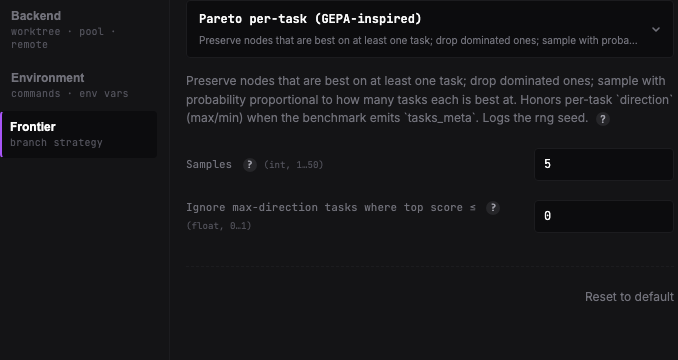
See Where experiments run for the full backend list and Frontier strategy for how parent selection affects the search.
Spawn from a node
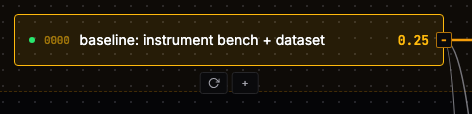
When you want evo to branch from a specific result, use the node action instead of giving a broad chat instruction. Hover over a node in the experiment tree; the action buttons appear below it. Click + to start a child experiment from that node.
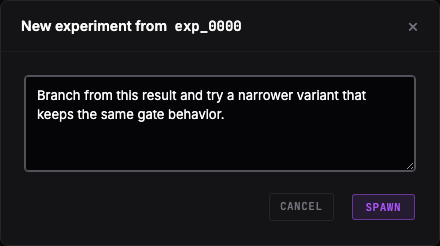
In the modal, write the directive for the child branch and click Spawn. evo sends that instruction to the orchestrator with the selected node as the requested parent.
What is evo?
evo-hq-cli), Apache-2.0 — the same package you install with uv tool install evo-hq-cli. Source on GitHub, releases on PyPI.evo is a plugin and CLI that turns an agent's improvement ideas into measured experiments. The agent proposes and edits; evo records baselines, runs benchmarks and gates, keeps valid wins, and leaves reviewable diffs.
Day to day, you do three things: invoke discover, invoke optimize, and watch the dashboard. The agent handles the experiment commands. discover explores the repository, decides what to measure, sets up the evaluation, and records a baseline. optimize tries changes in isolated copies of the repo, keeps passing improvements, and discards the rest. Whether it keeps going unattended or checks in after a round is controlled by your instruction and saved defaults.
You invoke those skills in your host's mention syntax: /evo:discover and /evo:optimize on Claude Code, $evo discover on Codex, the slash skill menu on Cursor, and natural language on Hermes, Opencode, OpenClaw, and Pi.
How it differs from a plain hill climb
evo is inspired by Karpathy's autoresearch, where an LLM runs experiments autonomously to beat its own best score. Autoresearch is a pure hill climb: try something, keep or revert, repeat on a single branch. evo adds structure on top of that idea.
- Tree search over greedy hill climb. Multiple directions can fork from any committed node, so exploration does not collapse to one path.
- Parallel semi-autonomous agents. The orchestrator spawns multiple subagents and runs them simultaneously, each in its own isolated git worktree. A subagent reads traces, formulates hypotheses, and can run multiple iterations within its branch.
- Shared state. Failure traces, annotations, and discarded hypotheses are accessible to every agent before it decides what to try next.
- Gating. Regression tests or safety checks are wired up as a gate. An experiment that fails a gate is discarded even if its score beats the current best.
- Observability. A dashboard to monitor the experiments as they run.
- Benchmark discovery. The
discoverskill explores the repo, figures out what to measure, and instruments the evaluation.
evo runs on Claude Code, Codex, Cursor, OpenClaw, Hermes, Opencode, and Pi. Experiments run locally in git worktrees or on remote sandboxes — Modal, E2B, Daytona, AWS, Azure, or your own SSH host.
The optimization loop
Once discover commits a baseline and you invoke optimize, the agent drives evo — reading state, forming hypotheses, editing code, running the benchmark, and deciding what to try next.
A round is one parallel batch of attempts. Each round the orchestrator picks where to extend the tree, dispatches subagents against structured briefs, collects their results, folds in cross-cutting findings, and starts the next round. At each turn boundary, the run behavior cascade decides whether the agent continues or checks in.
Parallel
The orchestrator dispatches subagents in parallel, one per brief. Each subagent runs in its own isolated workspace — a git worktree for local backends, a separate container for remote ones — so concurrent edits never collide. On startup a subagent picks up shared state (failure traces, annotations, discarded hypotheses), reads the pointer traces its brief names, forms one concrete hypothesis, edits the target, and runs the benchmark plus any inherited gates.
A subagent carries an iteration budget. If budget remains and its prior edit warrants a follow-up, it continues on the same branch within the same round — running several serial attempts before returning. The number of parallel subagents per round and the per-subagent budget are both configurable when you invoke optimize:
| Parameter | Default | Controls |
|---|---|---|
subagents | 5 | Parallel subagents dispatched per round |
budget | 5 | Max iterations each subagent runs within its branch |
stall | 5 | Consecutive rounds without improvement before auto-stopping |
Tree search
evo does not collapse exploration onto a single hill-climb path. Multiple directions can fork from any committed node: a strong result becomes a parent that several subagents branch from with different hypotheses. The result is a tree, not a linear chain — a promising-but-not-best branch stays available to extend later instead of being dropped the moment something else scores higher.
Frontier strategy
After each round the orchestrator selects which committed branch to extend next. The frontier strategy decides that pick:
- argmax — extend the highest-scoring branch.
- top_k — round-robin among the K best branches.
- epsilon_greedy — extend the best branch most of the time, a random branch occasionally.
- softmax — sample a branch with probability weighted by score.
- pareto_per_task — keep per-task specialists that an aggregate score would hide.
Configure the strategy in the dashboard under Settings → Frontier, which lists each strategy's parameters. The orchestrator uses the configured ranking when choosing parents for the next round.
Cross-cutting scans
Between rounds, read-only scan subagents read the round's trace batches in parallel and surface compound failure patterns — shared root causes recurring across experiments, gates that multiple branches consistently fail, single experiments hitting several failure modes at once. These are patterns no individual subagent sees from inside its own branch. The findings land in shared state, and the next round's subagents read them at startup — so they avoid the failure patterns the previous round already hit.
Shared state
Failure traces, annotations, and discarded hypotheses are visible to every agent before it decides what to try next. A subagent annotates its own experiment before the branch is cleaned up, so the lesson outlives the worktree; the orchestrator records cross-cutting notes tied to specific nodes or to the round as a whole. This shared memory is what keeps parallel subagents from independently rediscovering the same dead end, and what lets the cross-cutting scans accumulate across rounds.
Experiment outcomes
Every attempt resolves to one of three outcomes:
| Outcome | Meaning |
|---|---|
| COMMITTED | The score improved and all inherited gates passed. The node is kept and becomes a candidate parent for future branches. |
| EVALUATED | The run completed but the score regressed or a gate failed. The node is inspected and either retried or discarded; it does not extend the best path. |
| FAILED | An infrastructure, runtime, or benchmark crash. The attempt produced no usable score and does not consume retry budget. |
Gates
A gate is a safety check that runs on every experiment. For example: your metric is "make the parser faster" and your gate is "the parser tests must still pass" — a faster version that breaks a test is rejected, even though it scored better. An experiment that fails a gate is discarded even when its score beats the current best.
Gates are how evo keeps the search honest: without them, the optimizer will find ways to return a constant, skip the actual work, or trade correctness for speed and still report a higher number.
The agent wires gates while it sets up and runs evo; you do not register them. The behavior still matters to understand — it determines which improvements evo may keep and which it discards regardless of score.
What qualifies as a gate
Any command that exits zero on pass and non-zero on fail. Common forms:
- A test suite —
pytest,cargo test,npm testand similar already exit non-zero on failure, so they work as gates unchanged. - An invariant script — a smoke test or assertion that a critical behavior still holds (the refund flow works, the output is valid JSON, a core test passes) and exits non-zero when it does not.
- A held-out score floor — the benchmark run against a reserved slice of tasks, configured to exit non-zero when the score on that slice drops below a threshold.
Inheritance down the tree
Gates are node-scoped policy and inherit to descendants. A gate registered at the root runs on every experiment in the tree. A narrower gate attached to a specific branch runs only on that branch and its descendants. This lets a global invariant (core tests must pass) cover the whole search while a tighter constraint applies only where it is relevant.
pre vs post phase
Each gate runs in one of two phases relative to the benchmark.
| Phase | When it runs | Use for |
|---|---|---|
pre | Before the benchmark. Failure aborts the run with no benchmark spend. | Checks decidable from the worktree alone: cheat detection, file-hash invariants, eval-data presence. |
post (default) | After the benchmark, using its output. | Checks that need benchmark results: score regression, output schema validation. |
When the agent runs an experiment, evo evaluates inherited gates in order — pre-gates before the benchmark, post-gates after — and only commits the experiment if the score improved and every gate passed.
When gates are attached automatically
The benchmark provenance decides whether a gate is mandatory:
- Benchmark built from scratch. When the discover skill constructs a benchmark (rather than reusing one already in the repo), it attaches a held-out-slice score-floor gate automatically before the baseline runs. This is the safety net against metric gaming and is not optional.
- Benchmark already exists in the repo. Gates are opt-in. The agent may add them, and subagents may add more during optimization, but none is forced.
What a gate failure looks like
An experiment that runs but fails a gate is recorded as evaluated, not committed — the run completed but the result is not kept. On the dashboard you see the experiment land and then drop out of the best path. If you notice the same gate failing across several experiments in a round, that is a signal worth acting on: the gate may be too tight, or the approaches share a flaw. You can steer the agent on this through a mid-run directive.
Where experiments run
Every experiment runs in its own isolated workspace. The backend decides where that workspace lives — a local git worktree, a reused local slot, an SSH host, or a cloud sandbox. The agent dispatches each experiment to the configured backend; you choose and configure backends in the dashboard, not on the command line.
Available backends
| Backend | Where it runs | Install |
|---|---|---|
worktree (default) | A local git worktree per experiment | Included |
pool | A fixed set of local workspaces, reused across experiments | Included |
ssh | Your own SSH host | Included |
modal | Modal serverless cloud | uv tool install 'evo-hq-cli[modal]' |
e2b | E2B cloud sandboxes | uv tool install 'evo-hq-cli[e2b]' |
daytona | Daytona cloud workspaces | uv tool install 'evo-hq-cli[daytona]' |
aws | AWS EC2 sandboxes | uv tool install 'evo-hq-cli[aws]' |
azure | Azure VMs | uv tool install 'evo-hq-cli[azure]' |
The three local/SSH backends ship with the CLI. Each cloud backend needs the matching provider extra; install it once when you set the CLI up:
uv tool install 'evo-hq-cli[modal]' # or [e2b], [daytona], [aws], [azure], [all]
Choosing and configuring a backend
Pick and configure the backend in the dashboard under Settings → Backend. That sets the workspace-wide default every experiment uses. Beyond the default, the agent can override the backend for an individual experiment — so a run that is mostly local can send one heavier experiment to a cloud sandbox without changing the workspace setting.
Provider auth and SDK packages
For a cloud backend, two things are separate and both must be in place:
- The provider extra — the SDK package installed via
uv tool install 'evo-hq-cli[<provider>]', plus the provider's own authentication (account credentials, API keys, or CLI login that the provider SDK reads). This is how evo reaches the cloud and stands up a sandbox. - The benchmark runtime environment — the variables your benchmark and gates need at run time. These are managed separately and injected into the experiment's process environment; they are not your local
.envbeing copied into the sandbox, and the remote worker does not read your local.envfile directly.
Keep the two distinct: provider auth gets evo a workspace; the benchmark runtime environment is what runs inside it.
How the agent touches remote workspaces
For local worktree and pool backends, the experiment files sit on disk and the agent can read and edit them with native file tools. For SSH and cloud backends, the files live on a remote host, so the agent uses portable workspace operations instead of native file tools — reads, writes, edits, globs, greps, and shell commands routed to the experiment's own workspace. The same operations work against local backends too, which is why an experiment behaves identically regardless of where it runs.
Telemetry and privacy
What evo sends
evo sends anonymous CLI-side telemetry to help improve the product. It does not read benchmark traces, project notes, prompts, command strings, file paths, environment values, git remotes, code contents, or raw exception text.
Telemetry events include low-risk operational fields such as anonymous install/session/workspace IDs, evo version, OS, host, backend/provider type, command phase, experiment status, whether a score existed, directional score deltas, and coarse failure categories. User-submitted use-case or feedback text is optional and scrubbed locally before sending.
What evo does not read
There are two privacy layers: the CLI scrubs secrets, emails, paths, URLs, env assignments, and long tokens before sending, and evo's telemetry endpoint performs an additional scrub pass before storage.
Controls
evo telemetry status
evo telemetry off
evo telemetry on
evo telemetry reset-id
EVO_TELEMETRY=0 evo ...
Telemetry is disabled automatically in CI unless EVO_TELEMETRY=1 is set. DO_NOT_TRACK=1 also disables it.
evo:discover
discover is the one-time setup skill. You invoke it once per repository; the agent explores the codebase, decides what to measure, builds and instruments the evaluation, attaches a safety gate when it constructs a benchmark from scratch, starts the dashboard, and runs the first experiment to establish a baseline score. After it finishes, the workspace is ready for evo:optimize.
You invoke the skill, answer a few short setup questions, and watch the dashboard; the agent runs evo init, evo new, evo run, and the rest on your behalf.
Invoking it
Invoke the skill through your host. Invocation syntax is host-specific: /evo:discover on Claude Code, $evo discover on Codex, the skill menu on Cursor, and natural language on Hermes, Opencode, OpenClaw, and Pi.
/evo:discoverWhat the agent asks you
discover keeps questions to a minimum. With no seeded context, it asks up to three things:
- What to optimize. Which file or surface should be iterated on. If the benchmark is obvious from the repo, the agent confirms its single pick in one sentence rather than presenting a list.
- The benchmark command. How the evaluation is run and scored. If no runnable eval exists, the agent proposes candidate optimization dimensions grounded in the actual repo (existing instrumentation, stated goals, TODOs) and asks you to pick one.
- The metric direction. Whether higher is better (
max) or lower is better (min).
If wiring is needed (the benchmark is not yet instrumented, or has to be built from scratch), the agent asks one more question: whether to wire it up in SDK mode (installs the evo agent SDK with the project's package manager, richer per-task logs) or inline mode (pastes a small helper into the benchmark, zero new dependencies). Both produce the same data. The agent never installs packages without your answer.
Seeding the answers to skip the questions
You can supply the target and intent in the invocation. When you name a specific file and metric, the agent treats it as intent and skips the corresponding questions.
/evo:discover make the JSON parser at src/parser.py fasterHere "faster" sets the direction (a latency metric, minimized) and src/parser.py sets the target, so the agent proceeds without asking you to pick.
What the agent does on your behalf
- Explores the repo — reads entry points, configs, tests, and any existing eval scripts to identify the optimization target, the metric direction, and behaviors worth protecting.
- Proposes dimensions when no obvious benchmark exists, then picks one with you.
- Leaves main untouched. Initialization sets up evo's local state; your main branch stays byte-identical to what you committed before. All benchmark and instrumentation work happens inside a baseline worktree, not on main. If you have uncommitted edits to the target, benchmark, or their dependencies, the agent stops and asks you to commit or stash them first — a worktree forks from the last commit, not your working tree.
- Constructs the benchmark inside the baseline experiment's worktree when one does not already exist: a scoring function, test cases, and a runnable harness, plus instrumentation in the mode you chose.
- Attaches a held-out gate automatically when it builds a benchmark from scratch. This is a score-floor check against a held-out slice — the safety net against the optimizer gaming the metric. It is mandatory and not skipped. When the benchmark already existed in the repo, gates are opt-in and the agent may add none at this stage.
- Starts the dashboard. Initialization auto-starts the dashboard and the agent relays the URL to you verbatim, for example:
If port 8080 is busy, evo increments to the next free port and the agent shows whichever it bound. This URL is your window into the run.Dashboard live: http://127.0.0.1:8080 (pid 12345) - Runs the first experiment — executes the benchmark on the unmodified target, captures the baseline score, and runs the gates.
What you get back
discover ends by reporting in chat: the dashboard URL, the baseline experiment ID and its score, the chosen optimization dimension and why, and a prompt to run evo:optimize to start the loop.
evo:optimize
Once discover has set up the workspace and committed a baseline, you invoke /evo:optimize to start the optimization loop. The agent drives the whole loop from there: it reads workspace state, spawns parallel subagents that each form a hypothesis and run experiments, and selects which results survive into the next round. At turn boundaries, your instruction and saved defaults decide whether it keeps driving rounds or checks in. Watch the dashboard as experiments land.
Invocation
/evo:optimizeParameters are passed as key=value after the skill name. They are all optional:
/evo:optimize subagents=3 budget=10 stall=3| Parameter | Default | Meaning |
|---|---|---|
subagents | 5 | Number of parallel subagents the agent spawns per round. |
budget | 5 | Maximum iterations each subagent may run within its own branch before reporting back. |
stall | 5 | Consecutive rounds with no score improvement before the loop auto-stops. |
What the loop does
The loop runs in rounds. In each round:
- The agent reads the current state of the experiment tree, identifies failure patterns that cut across branches, and writes one bounded brief per subagent (objective, parent node to branch from, boundaries, and which traces to study).
- It spawns up to
subagentssubagents in parallel. Each one branches from its assigned node, makes a concrete edit in its own isolated worktree, runs the benchmark, and may iterate further on its branch up tobudgettimes if an early result warrants a follow-up. - When the round's subagents return, the agent collects their results and selects the frontier for the next round — which nodes are most promising to branch from, which branches have plateaued, and which to prune.
The next round's briefs are built from that selection plus cross-cutting analysis of the round's results, so subagents don't re-attack walls earlier rounds already hit.
Run behavior and interruption
If a round produces no subagent that improves on the current best score, the agent increments a stall counter; any improvement resets it. After stall consecutive rounds with no improvement, the loop stops on its own and the agent prints a final summary — the best score and its experiment ID, how many experiments ran, and the winning diff. The loop also stops if the score reaches the theoretical maximum for the metric.
You can interrupt at any point; the loop stops at the next turn boundary. Whether it keeps going unattended, and whether the orchestrator may edit directly, is resolved from your instruction first, then saved defaults.
How run behavior is chosen
The words you use when invoking optimize are part of the setup. evo resolves behavior in this order:
| Priority | What controls it | Examples |
|---|---|---|
| 1 | Your current instruction to the agent | run autonomously, check in after one round, use subagents only, you may edit directly |
| 2 | Project defaults | evo config set default-autonomous on, evo config set default-subagents-only off |
| 3 | Your cross-project defaults | evo defaults set autonomous on, evo defaults set subagents-only on |
| 4 | Framework fallback | For the current optimize skill, unattended and subagents-only operation are the fallback unless you clearly ask otherwise. |
Be explicit when the difference matters. "Just run it overnight" steers toward autonomous operation. "Run one round and stop" or "check in with me" steers away from it. "Use subagents only" steers the orchestrator away from direct edits; "you may edit directly" allows direct orchestrator edits.
Autonomous continuation
With autonomous on, the orchestrator is re-prompted at every turn boundary to keep driving the loop until the stall limit is hit or you interrupt. With it off, the agent stops naturally at a turn boundary after finishing a round.
To turn it off mid-run, send evo autonomous off or evo exit-optimize-mode.
Subagents-only
With subagents-only on, the orchestrator's file-mutation tools (Edit/Write, mutating Bash) are denied on an alternating cadence: the 1st violation is blocked, the 2nd is allowed, the 3rd is blocked, and so on. Each block nudges the orchestrator to delegate the edit to a subagent. This is a nudge, not a hard block: the orchestrator can still land an edit on an even-numbered attempt. Subagent edits are never gated. With it off, the orchestrator can edit files directly.
To lift it mid-run, send evo subagents-only off or evo exit-optimize-mode.
Remembering your choice
You don't have to restate these choices every run. Store the behavior you want for a project, or store a cross-project default for future repos. A clear instruction in the current message still wins over saved defaults.
Change them anytime — for the current project:
evo config set default-autonomous on|off
evo config set default-subagents-only on|off
Or your cross-project default, used when a project has no setting of its own:
evo defaults set autonomous on|off
evo defaults set subagents-only on|off
evo defaults show                       # what's remembered across projects
Claude Code workflow driver
Claude Code users can opt into a workflow-backed optimize driver. This is an execution driver for /evo:optimize, not a separate Evo flow: you still invoke discover, invoke optimize, and watch the dashboard. The workflow driver runs the optimize loop inside Claude Code's Workflow tool, so it self-drives until its stall limit and does not need the autonomous stop-nudge.
Use it only when all of these are true: the workspace host is Claude Code, your Claude Code build exposes the Workflow tool, and you want the deterministic workflow driver instead of the prose loop. The usual way to opt in is to ask the agent when you invoke optimize:
/evo:optimize use the workflow driver, subagents=3 budget=5 stall=5If you want workflow mode to be the project default, set it once:
evo host set claude-code                 # if the workspace predates host tracking
evo config set default-orchestrator workflow

/evo:optimize subagents=3 budget=5 stall=5
When this driver is active, use Claude Code's Workflow controls to monitor or message the running workflow. evo direct is for the prose loop and subagent sessions; it is not the workflow control path.
If the Workflow tool is unavailable, the agent falls back to the prose loop and should reset default-orchestrator to prose so the run does not stall. To go back manually:
evo config set default-orchestrator proseSteering a run with directives
In the default prose loop, you can steer a run while it is going, in plain language, without stopping it:
- "Focus on reducing token cost, but don't change the answer format."
- "Try optimizing retrieval before touching the prompt."
- "Stop exploring caching — it isn't acceptable here."
Under the hood this is evo direct: it injects an authoritative message into the active agent's context — the agent treats it as a new instruction from you, supersedes earlier constraints it contradicts, and carries the text into the work it hands to subsequent subagents.
The directive applies whether it lands on the orchestrator or a specific subagent, and the agent confirms receipt so you can tell it was delivered. The full directive command surface — broadcasting, targeting a subagent, blocking until acknowledged — lives in the CLI reference. If you use Claude Code's workflow driver instead, use the Workflow controls described above.
While the loop is running
subagents-only on, evo nudges the orchestrating agent away from editing files directly and toward spawning subagents instead, so each change lands isolated in its own experiment branch with a recorded result rather than accumulating uncommitted edits in the main tree. The nudge applies for the duration of the run and clears when the loop stops or you interrupt it. When it is off, the orchestrator can edit files directly.Throughout the run, the dashboard reflects the live tree: new experiments as subagents commit them, the moving best score, and the frontier the next round will branch from.
CLI reference (agent-driven)
evo new or evo run yourself.
Mental model
The CLI orchestrates experiments; the Agent SDK instruments benchmark code. The agent uses the commands in this order:
evo initsets up a workspace and starts the dashboard.evo newallocates an experiment under a parent node.evo runexecutes the benchmark plus inherited gates and commits when the score improves and gates pass.evo run --checkvalidates wiring without mutating experiment state.evo scratchpadis the agent's bounded view of current state.evo gate …defines branch policy; gates inherit down the tree.evo config runtime …andevo env …describe runtime state.- Workspace ops (
bash/read/write/edit/glob/grep) are the portable way to touch experiment files — required for remote backends, recommended for local so the same code works regardless of backend.
All writes go through the CLI (evo config set, evo new, evo run, evo discard, evo restore, evo gate add, evo env load, evo set, evo annotate, evo note, evo infra event). The CLI holds advisory locks so concurrent writes from the dashboard and parallel subagents do not corrupt graph or config state. The one file the agent edits directly is the persistent project notes; everything else is lock-managed and read through a getter.
Setup (evo init)
evo init \
  --name "<project name>" \
  --target <entrypoint-file> \
  --benchmark "<command using {worktree} and/or {target}>" \
  --metric <max|min> \
  --host <claude-code|codex|opencode|openclaw|hermes|pi|generic> \
  [--instrumentation-mode <sdk|inline>] \
  [--gate "<command>"] \
[--commit-strategy <all|tracked-only>]| Flag | Meaning |
|---|---|
--name | Dashboard display text. Existing unnamed workspaces fall back to the repo directory name. |
--target | The evaluation entrypoint passed to {target}. It is not the entire optimization boundary. |
--benchmark | The command evo runs. Use {worktree} for files created in experiment branches. |
--metric | max or min — the direction that counts as improvement. |
--host | Records the orchestrator runtime; controls whether subagent dispatch is available. |
--instrumentation-mode | sdk or inline. |
--gate | Workspace-default gate command. |
--commit-strategy | all or tracked-only. |
Configuration (evo config)
evo config show [--json]            # full redacted dump
evo config get <field> [--json]     # one field
evo config set <field> <value>      # mutate one field
Settable / gettable fields: project-name, target, benchmark, metric, commit-strategy, max-attempts, gate, frontier-strategy, default-autonomous, default-subagents-only, default-orchestrator.
evo config set metric max
evo config set max-attempts 6
evo config set gate "pytest -q"            # empty string clears
evo config set frontier-strategy epsilon_greedy
evo config set frontier-strategy '{"kind": "top_k", "params": {"k": 4}}'
evo config set default-autonomous on
evo config set default-subagents-only on
evo config set default-orchestrator workflow

evo config get metric                       # -> max
evo config get frontier-strategy --json # -> {"kind": "...", "params": {...}}| Field | Setter | Reader | Notes |
|---|---|---|---|
project_name | evo config set project-name | evo config get project-name | |
target | evo config set target | evo config get target | Path the orchestrator edits. |
benchmark | evo config set benchmark | evo config get benchmark | Command that emits a score. |
metric | evo config set metric | evo config get metric | max or min. |
commit_strategy | evo config set commit-strategy | evo config get commit-strategy | all or tracked-only. |
max_attempts | evo config set max-attempts | evo config get max-attempts | Per-experiment retry cap. Default 3. |
gate | evo config set gate | evo config get gate | Workspace-default gate. Per-node gates: evo gate add. |
frontier_strategy | evo config set frontier-strategy | evo config get frontier-strategy | Kinds: argmax, top_k, epsilon_greedy, softmax, pareto_per_task. |
default_autonomous | evo config set default-autonomous | evo config get default-autonomous | Project default for continuing across turn boundaries: on or off. |
default_subagents_only | evo config set default-subagents-only | evo config get default-subagents-only | Project default for nudging orchestrator edits into subagents: on or off. |
default_orchestrator | evo config set default-orchestrator | evo config get default-orchestrator | prose or Claude Code-only workflow. |
runtime recipe | evo config runtime set | evo config runtime show | --prepare, --before-run, --prefix. |
runtime_env | evo env load/inherit-shell/clear | evo env show | Separate top-level command. |
execution_backend | evo config backend <name> | evo config backend show | worktree, pool, remote. |
current_eval_epoch | evo infra event --breaking | evo infra log | Advances on breaking events; blocks cross-epoch comparisons until the next run. |
comparison_blocked | evo infra event --breaking | evo config show --json | Cleared after a successful run. |
repo_root, workspace_dir, worktrees_dir, initialized_at | (none) | evo config show --json | Init-only; do not edit. |
The orchestrator host (which agent runtime is driving the run) is stored separately from project config. Read it with evo host show, set it with evo host set <claude-code|codex|cursor|opencode|openclaw|hermes|pi|generic>. This uses the same host names as evo init --host.
Runtime recipe (evo config runtime)
evo config runtime show [--json]
evo config runtime set \
  [--prepare "<cmd>"] \
  [--before-run "<cmd>"] \
[--prefix "<cmd>"]prepareruns in the experiment workspace before benchmark and gates.before-runruns in the experiment workspace before each attempt.prefixprepends benchmark and gate commands, e.g.uv runorpnpm exec.
The recipe is how the agent avoids hard-coding local paths like {worktree}/.venv/bin/python — those paths do not exist in fresh experiment worktrees.
Runtime env (evo env)
evo env show [--json]
evo env inherit-shell <on|off>
evo env load <path> --all
evo env load <path> --allow KEY1,KEY2
evo env clear- Env values resolve fresh on each
evo run. - Config stores source metadata and key names, not secret values.
- Dotenv files are read by the orchestrator and injected into the local or remote process env. Remote workers do not read a local
.envfile directly. - Gates receive runtime env but not
EVO_*artifact variables.
Backends (evo config backend)
evo config backend show [--json]
evo config backend worktree
evo config backend pool --workspaces /abs/slot-a,/abs/slot-b
evo config backend remote --provider <provider> [--provider-config k=v,...]
Per-experiment overrides are available on evo new:
evo new --parent <id> -m "<hypothesis>" --backend remote --provider e2b
evo new --parent <id> -m "<hypothesis>" --remote modal
Provider auth and SDK packages are separate from benchmark runtime env. See Backends for where each one runs.
Experiment lifecycle
evo new --parent <parent_id> -m "<hypothesis>"
evo run <exp_id> [--timeout <seconds>] [--force]
evo run <exp_id> --check [--timeout <seconds>]
evo abort <exp_id> [--timeout <seconds>] [--force]
evo done <exp_id> --score <float> [--traces <dir>] [--no-compare]
evo discard <exp_id> --reason "<why>" [--force]
evo prune <exp_id> [--exhausted|--invalid] [--yes] [--reason "<why>"]
evo restore <exp_id>
evo gc
Lifecycle rules
evo runrefuses to start a second attempt while another attempt for the sameexp_idhas an alive driver PID (silent concurrent attempts multiply API spend by N).--forcebypasses when the prior driver is gone but its state was not reclaimed (e.g. recycled PID). The remote backend skips the guard — its resume logic handlesstatus=activenatively.evo abort <exp_id>SIGTERMs the driver process of the current attempt; if it does not exit within--timeoutseconds (default 5), it escalates to SIGKILL.--forceskips the grace period. It aborts only the driver — workers detached viasetsid/nohupsurvive.evo discardis for non-committed nodes (active / evaluated / failed). It refusescommittednodes (useevo prune), refusesactivewithout--force, and refuses any node with non-discarded children.evo pruneacceptscommittedorevaluatednodes.--exhaustedcloses a branch while keeping its score eligible for best/report/ship. This is the default for backwards compatibility.--invalidmarks the result wrong and excludes it and its descendants from best/frontier/ship. Invalidating a node on the current best valid spine requires--yes.evo restorereverts a prune or discard. Discarded nodes can be restored as long as the result has not been garbage-collected; if it has, the error message points to the saved diff.evo gcreclaims disk by freeing worktree directories from finished nodes. The agent runs it periodically; it is not part of the experiment-iteration flow.
Outcomes
| Outcome | Meaning |
|---|---|
COMMITTED | Score improved and gates passed; the node is kept. |
EVALUATED | The run completed but the score regressed or a gate failed; the agent inspects and either retries the same node or discards it. |
FAILED | Infra / runtime / benchmark crash; does not consume retry budget. |
evo done is for externally scored runs only. The agent does not call it after a successful evo run.
Gates
evo gate add <node_id> --name <name> --command "<cmd>" [--phase pre|post]
evo gate list <node_id>
evo gate remove <node_id> --name <name>
evo gate check <node_id> [--timeout <seconds>]- Gates are node-scoped policy and inherit to descendants.
--phase preruns the gate before the benchmark. Failure aborts the run with no benchmark spend. Use for checks decidable from the worktree alone (cheat detection, file-hash invariants, eval-data presence).- Default is
post: runs after the benchmark, when the gate needs benchmark output to evaluate (score regression, output schema). evo run <exp_id>evaluates inherited gates — pre-gates before the benchmark, post-gates after.- Gate pass/fail is exit-code based only. A command that prints a low score and exits 0 passes. Use tests or score-floor gates that exit non-zero on regression.
evo gate checkruns all gates regardless of phase (forensic) and does not mutate node state.
Inspection
These read-only commands are what you reach for to inspect a run. They never mutate state.
evo status                                        # one-liner: metric, best, counts
evo report [--watch [SECONDS]]                    # terminal dashboard chart
evo scratchpad                                     # bounded state digest
evo show <exp_id>                                  # full state of one experiment
evo tree                                           # full tree (no bounding)
evo frontier [--strategy <kind>] [--params '<json>'] [--seed <n>]
evo path <exp_id>                                  # root-to-node chain
evo diff <exp_id> [other_id]                       # diff vs parent or between two
evo traces <exp_id> [task_id]                      # per-task trace detail
evo get <exp_id> [filename]                        # raw artifact read
evo log <exp_id> <filename>                        # raw log read
evo awaiting                                       # evaluated nodes pending decision
evo discards [--like "<text>"]                     # discarded nodes, searchable
evo annotations [--task <id>] [--exp <id>]         # per-experiment analyses
evo notes [--exp <id>] [--workspace] [--limit N]   # all notes, recent first
Annotation & notes
evo annotate <exp_id> [task_id] "<analysis>"     # per-experiment, attempt-time
evo set <exp_id> --note "<text>" [--tag <tag>]   # per-node, orchestrator
evo note "<text>"                                 # workspace-level, untied
evo notes [--exp <id>] [--workspace] [--limit N]  # read notes
evo infra event -m "<message>" [--breaking]       # record infra/strategy event
evo infra log [--limit N] # read recorded events- Subagents annotate their own experiments before discard so the lesson outlives the worktree.
- The orchestrator attaches per-node notes for cross-cutting findings tied to a specific node, and writes workspace notes for round-level observations not tied to any one experiment.
--breakingon an infra event marks a benchmark or environment change that invalidates cross-epoch score comparisons until the next run clears it.
Loop control
evo wait [--timeout SEC]      # block until any experiment reaches a terminal
                              # state (committed / evaluated / failed /
                              # discarded). Per-task traces and other
                              # in-flight writes are ignored. Default 3600,
                              # capped at 3600 (1h). Exit 0 with a one-line
                              # summary on transition, 124 on timeout.

evo exit-optimize-mode        # halt the optimize-mode protocol for this
                              # session: clears the safety nudge, discards
                              # any active experiments, reports orphan
                              # `evo run` PIDs, and prints the remaining
                              # halt steps.

evo autonomous on|off         # arm/disarm the keep-going loop for this run
evo subagents-only on|off     # arm/disarm the orchestrator-edit gate

evo config set default-autonomous on|off       # this project's default
evo config set default-subagents-only on|off
evo config set default-orchestrator prose|workflow
evo defaults set autonomous|subagents-only on|off   # cross-project default
evo defaults show             # what's remembered across projects
evo wait is the primitive the orchestrator uses to block on subagent results instead of polling. Optimize mode is set automatically when you invoke /evo:optimize (or the host equivalent); there is no enter command. Autonomous and subagents-only are session flags that the agent arms according to the current user instruction and saved defaults. default-orchestrator chooses the optimize driver: prose everywhere, or workflow for Claude Code when the Workflow tool is available. Under autonomous mode the loop self-suppresses once no new experiment commits between two consecutive stops, so the agent can stop when it is done.
Telemetry
evo telemetry status [--json]
evo telemetry on
evo telemetry off
evo telemetry reset-id
evo telemetry usecase --description "<text>" [--tag <tag>]
evo telemetry feedback --kind <kind> --phase <phase> \
  --summary "<text>" --expected "<text>" --actual "<text>" --repro "<text>" \
  [--exp-id <exp_id>] [--tag <tag>]
Telemetry is anonymous, best-effort, and CLI-side. See Telemetry and privacy for what is collected and what evo deliberately does not read.
Mid-run directives
This is your live steering surface. While a run is in flight you can inject a user-authoritative message that reaches the engaged orchestrator session (or a specific subagent), and the agent treats it as a new user turn.
evo direct "<text>"                          # broadcast to engaged orchestrator sessions
evo direct <exp_id> "<text>"                 # targeted at a specific subagent
evo direct "<text>" --wait                   # block until any session acks (exit 3 on timeout)
evo direct "<text>" --wait --wait-timeout 30 # custom timeout in seconds (default 60)
evo direct-status <event_id>                 # queue / delivery / ack state for one directive
evo ack <event_id>                           # run by the agent to confirm receipt
The agent sees a directive as a banner in its context:
[EVO DIRECTIVE id=01HX7K…]
<text>
[END EVO DIRECTIVE — run `evo ack 01HX7K…` to confirm you have received this message, then proceed]
The banner is user-authoritative: the agent treats its content as a new user turn, overrides earlier constraints it contradicts, and runs evo ack <id> on receipt so evo direct-status and evo direct --wait report success. evo ack is the agent's command — you send the directive, the agent acks it. Fanout output prints fanout=N, skipped_unengaged=M, skipped_subagent=K; sessions registered at start but otherwise idle are filtered out, so only engaged sessions on supported hosts receive a broadcast.
Workspace ops
The agent uses these when an experiment may be remote, or when it was handed an explicit experiment id. They are the portable file-access layer that works identically on local and remote backends.
evo bash --exp-id <exp_id> "<command>" [--cwd <path>] [--timeout <seconds>]
evo read --exp-id <exp_id> <path>
evo write --exp-id <exp_id> <path> [--content "<text>"]
evo edit --exp-id <exp_id> <path> --old "<old>" --new "<new>" [--replace-all]
evo edit --exp-id <exp_id> <path> --json-stdin
evo glob --exp-id <exp_id> "<pattern>" [--path <dir>]
evo grep --exp-id <exp_id> "<pattern>" [--path <dir>]
--exp-id is required by design. Concurrent subagents may own different remote containers, so there is no safe default active experiment. For local worktree and pool backends, native file tools work against the actual worktree path returned by evo new.
Upgrading
Upgrading is something you run, not the agent. evo keeps the CLI on your PATH in lockstep with the host plugin it installs. The CLI binary, the skill files, and the hook protocol share wire formats; letting them drift caused silent failures in earlier versions, so every update moves them together.
Update commands
evo update                           # update CLI + every installed host
evo update <host>                    # update one host (also bumps the CLI to match)
evo update <host> --version 0.4.1    # pin one host to a specific release
evo update with no arguments updates the CLI and every host you have installed. Pass a single host (claude-code, codex, cursor, hermes, opencode, openclaw, or pi) to update just that one; the CLI is still bumped to match the plugin version it installs. Add --version to pin a host to a specific release instead of taking the latest.
uv tool install --editable, pip install -e) are detected and left untouched by evo update. See Dev install below. Run evo update --help for the full flag list.Migrating from any pre-0.4.4 version
uv tool install --force evo-hq-cli && evo update --force--force wipes the host plugin cache and reinstalls. It works around anthropics/claude-code#14061, where /plugin update returns success but does not replace the cached plugin files. Without --force, an upgrade from a pre-0.4.4 version can leave stale plugin files in place while the CLI advances, reintroducing the version drift the lockstep install exists to prevent.
Testing a pre-release (alpha)
uv and pip skip pre-releases by default. To install an alpha, pin both the CLI version and the host plugin tag:
uv tool install --force 'evo-hq-cli==0.4.1a2' && \
  evo update --version 0.4.1-alpha.2 --force
Substitute the target alpha version. The two forms differ: the CLI uses PEP 440 form (0.4.1a2), and the marketplace tag uses the dash form (0.4.1-alpha.2). Both must point at the same release so the CLI and the plugin stay matched.
Dev install
For development on evo itself, install the plugin editable from a clone:
git clone https://github.com/evo-hq/evo
cd evo
uv tool install --editable plugins/evo
An editable install points the CLI at your working tree, so changes take effect without reinstalling. evo update recognizes editable installs and will not overwrite them.
Troubleshooting
Verify an install
After evo install <host>, confirm the plugin and hooks are in place before invoking any skill:
evo doctor <host> # claude-code | codex | cursor | hermes | opencode | openclaw | pievo doctor reports whether the host plugin is installed, whether the hooks evo needs to reach in-flight subagents are staged, and whether the CLI on PATH matches the host plugin version. If it flags a version mismatch, see Update didn't take effect below — a drifted CLI and skill bundle fail silently rather than erroring.
Codex hooks not firing
Codex requires manual approval for plugin hooks. If you installed evo for Codex and directives, acks, or subagent coordination are not reaching the agent, the hooks were never trusted.
Inside Codex, run /hooks and trust evo's hooks. To skip the prompt at install time, pass --trust-hooks:
evo install codex --trust-hooksUpdate didn't take effect
A plain evo update updates the CLI and every installed host plugin in lockstep. If the agent is still on the old skill behavior after an update — old prompts, missing flags, version mismatch reported by evo doctor — the host's plugin cache was not replaced. /plugin update returns success but leaves cached plugin files in place (anthropics/claude-code#14061).
Force a clean reinstall, which wipes the host plugin cache:
evo update --forceComing from any pre-0.4.4 version, reinstall both the CLI and the host plugin:
uv tool install --force evo-hq-cli && evo update --forceThe CLI binary, the skill files, and the hook protocol share wire formats. When they drift, skills fail silently — which is why evo install and evo update keep the PATH CLI and the host plugin version locked together. Editable installs (uv tool install --editable, pip install -e) are detected and left untouched.
Dashboard URL didn't come back, or port in use
The dashboard starts automatically when the agent runs the discover skill and prints its URL in chat:
Dashboard live: http://127.0.0.1:8080 (pid 12345)If 8080 is in use, evo increments to the next free port (8081, 8082, …) and prints whichever it bound. Subsequent runs reuse the chosen port. The agent relays this line verbatim — watch for it and open the URL it actually prints, not 8080.
A supervisor process owns the dashboard's lifecycle and respawns it on unexpected exit. After repeated rapid failures shortly after startup, the supervisor gives up rather than respawning in a tight loop, and writes .evo/dashboard.dead with a one-line diagnostic. The underlying error (a traceback) is at the end of .evo/dashboard.log.
When the dashboard has given up, restart it manually from the repo root:
uv run --project /path/to/evo/plugins/evo evo dashboard --port 8080Common mistakes
The agent issues every evo new / evo run / evo gate command, so these are not steps you perform. They are behaviors to recognize: if a run is misbehaving, one of these is usually why, and knowing them tells you what to correct in the setup or in the directive you send.
- Hand-edited
.evo/config does not stick. Configuration lives behind advisory locks and the dashboard may be writing concurrently. Editing the JSON by hand races those writes and bypasses validation. All config changes go throughevo config …,evo env …, or the dashboard settings tabs. - A gate that does not exit non-zero on failure does nothing. Gate pass/fail is decided purely by exit code: 0 passes, non-zero fails. A command that prints a low score and exits 0 passes the gate, and the search will exploit that. Real gates are test suites (which already exit non-zero on failure) or score-threshold checks (
--min-scorestyle) that exit 1 on regression. Without a working gate, the search finds ways to return a constant or trade correctness for speed. - Remote experiments need workspace ops, not native file access. When an experiment runs on a remote backend (Modal, E2B, Daytona, AWS, Azure, SSH), its files are not on your local disk. Reading or editing them requires
evo bash/read/write/edit/glob/grep --exp-id <id>. Native file tools against a remote worktree path silently touch the wrong files. Concurrent subagents may own different containers, so there is no safe default experiment —--exp-idis required by design. - Uncommitted local edits do not enter the experiment tree. Experiments fork from the current branch's committed HEAD, not the dirty working tree. If the optimization target, benchmark, or a gate dependency has uncommitted changes, the whole tree gets built against stale code. The discover skill stops and asks you to commit or stash before it proceeds — do that rather than working around it.
- Secrets and local paths do not belong in benchmark code. Env values are injected per run via
evo env; runtime setup (interpreter prefix, prepare steps) lives in the runtime recipe viaevo config runtime. The agent should not copy.envinto worktrees or hard-code paths like a local.venv— those break the moment an experiment runs on a different backend. Remote workers do not read your local.envdirectly.
To intervene in a running optimization without touching config, send a mid-run directive (a slash command or natural-language instruction to the agent). The agent treats the directive as authoritative and acts on it. Use that surface rather than editing state under .evo/.